
Skip to content

استلام شحنة Controlant الخاصة بك - تحميل البيانات يدويًا
Arabic text: Receiving your Controlant shipment, manual data upload, and when a manual upload is needed
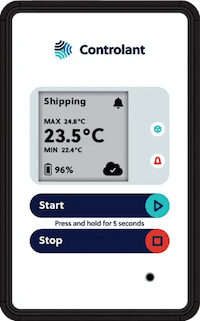
Saga device in Shipping mode, 23.5 °C. The Start and Stop buttons sit below the screen, with the note: press and hold for 5 seconds

English · Español · Français · Italiano · Português - Brasil · Português - Portugal · العربية · 日本語

No Signal and Manual Data Upload Process with Saga
No Signal and Manual Data Upload Process with Saga

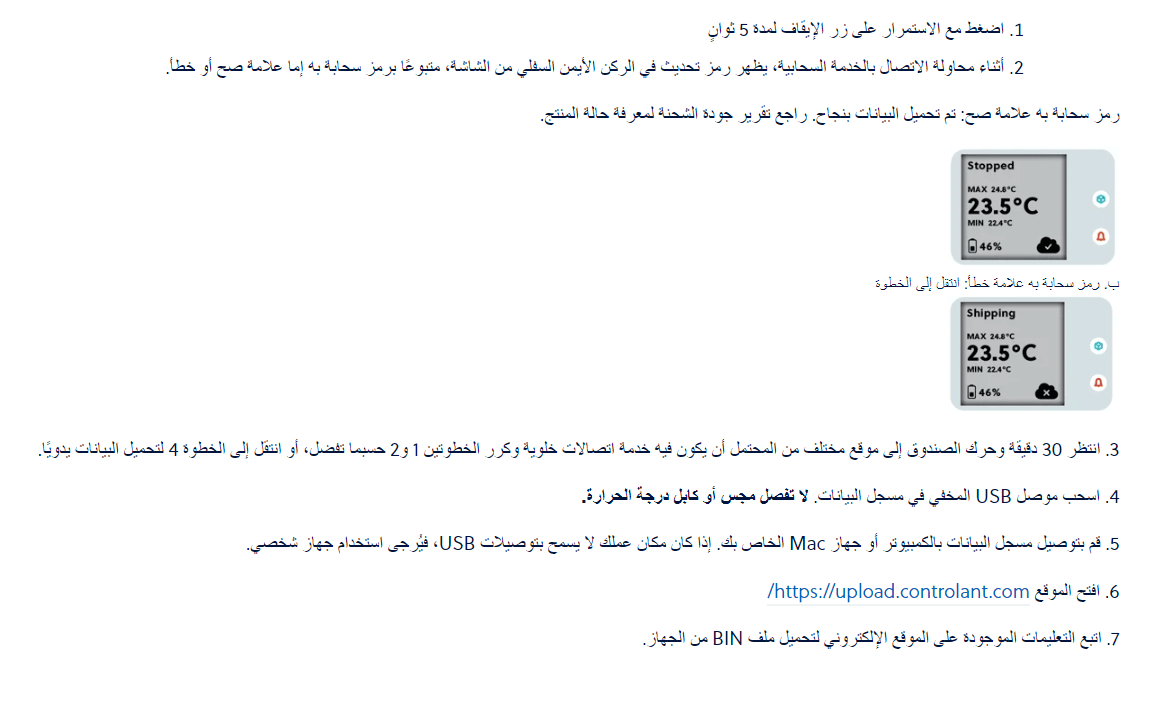
Arabic text: steps 1 to 7 for uploading data manually, with the device screens showing a cloud icon with a tick and with a cross
Arabic text: if upload.controlant.com reports that the upload failed, wait 30 minutes and try again, then email the DATA.BIN file to support@controlant.com